
- Create and manage permissions for your Google Cloud resources with Identity Access Management (IAM).
- Provides a unified view into your organization’s security policy with built-in auditing to ease compliance purposes.
Features
- Lets you authorize who can take specific actions on resources to give you full control and visibility on your Google Cloud services centrally.
- Permissions are represented in the form of service.resource.verb
- Can map job functions into groups and roles.
- With IAM, users only get access to what they need to get the job done.
- Cloud IAM enables you to grant access to cloud resources at fine-grained levels, well beyond project-level access.
- You can leverage Cloud Identity to easily create or sync user accounts across applications and projects.
- IAM lets you set policies at the following levels of the resource hierarchy:
- Organization level
- The organization resource represents your company.
- IAM roles granted at this level are inherited by all resources under the organization.
- Folder level
- Folders can contain projects, other folders, or a combination of both.
- Roles granted at the highest folder level will be inherited by projects or other folders that are contained in that parent folder.
- Project level
- Projects represent a trust boundary within your company.
- Services within the same project have a default level of trust. For example, App Engine instances can access Cloud Storage buckets within the same project.
- IAM roles granted at the project level are inherited by resources within that project.
- Resource level
- Grant certain users permission to a single resource within a project.
- Organization level
Roles
- A role contains a set of permissions that allows you to perform specific actions on Google Cloud resources.
- You don’t directly grant users permissions in IAM. Instead, you grant them roles, which bundle one or more permissions.
- To make permissions available to members, including users, groups, and service accounts, you grant roles to the members.
- There are three types of roles in Google Cloud IAM:
- Basic Roles
- Includes Owner, Editor, and Viewer role that existed prior to the introduction of IAM.
- Predefined Roles
- Provides granular access for a specific service and is managed and defined by Google Cloud.
- Prevents unwanted access to other resources.
- Google is responsible for updating and adding permissions as necessary.
- Custom Roles
- Provides granular access according to a user-defined list of permissions.
- You can create a custom IAM role with one or more permissions and then grant that custom role to users or groups.
- Custom roles are not maintained by Google.
- You can grant multiple roles to a user or a group.
- Basic Roles
Service Accounts
- A service account is a special kind of account used by an application or a virtual machine (VM) instance, not a person.
- Applications use service accounts to make authorized API calls, authorized as either:
- the service account itself
- as Google Workspace
- as Cloud Identity users through domain-wide delegation
- A service account is identified by its email address, which is unique to the account.
- @.iam.gserviceaccount.com
- Each service account is associated with two sets of public/private RSA key pairs used to authenticate to Google.
- Types of service accounts:
- User-managed service accounts
- Default service accounts
- Google creates a user-managed service account when you use Google Cloud services. These accounts are called default service accounts.
- The default service accounts help you get started with Google Cloud services quickly.
- In addition to being an identity, a service account is also a resource with IAM policies attached to it, which means you can define who can use the account and who can perform specific actions on the service account.
Policy
- A policy is a collection of bindings, audit configuration, and metadata.
- A binding associates (or binds) one or more with a single and any context-specific conditions that change how and when the role is granted.
- Each binding includes the following fields:
- A member, known as an identity or principal, can be a:
- User Account
- Service Account
- Google group
- Domain
- A role, which is a named collection of permissions that grant access to perform actions on Google Cloud resources.
- A condition, which is a logical expression that further constrains the role binding based on attributes about the request, such as its origin, the target resource, and more.
- A member, known as an identity or principal, can be a:
Groups
- Groups help you manage your users at scale. It is a simple way to attach roles to users with the same job functions.
- Each member of a Google group inherits the Identity and Access Management (IAM) roles granted to that group.
- A user can belong to multiple groups.
Best Practices
- Enforce least privilege at all times.
- Mirror your Google Cloud resource hierarchy structure to your organization structure.
- Set policies at the organization level and at the project level rather than at the resource level.
- It is easier and better to manage members in a Google group than to update an IAM policy.
- In deciding how to use a service account, use the following flow-chart to guide you in your decision-making process.
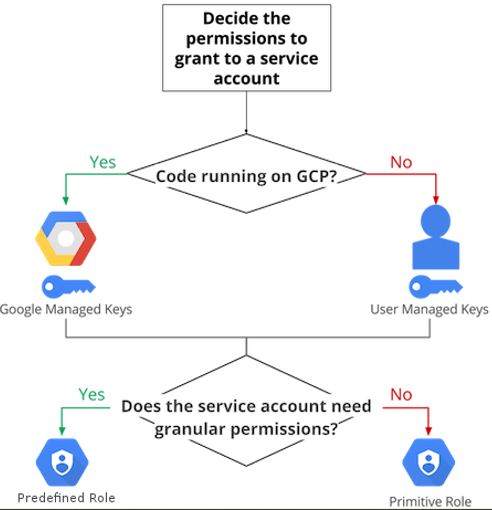
- Rotate your service account keys using the IAM service account API.
- For production workloads, it’s best practice to use user-managed service accounts instead of the default service accounts.
Comments
Post a Comment