Event-driven Transfer on Storage Transfer Service for Google Cloud Storage

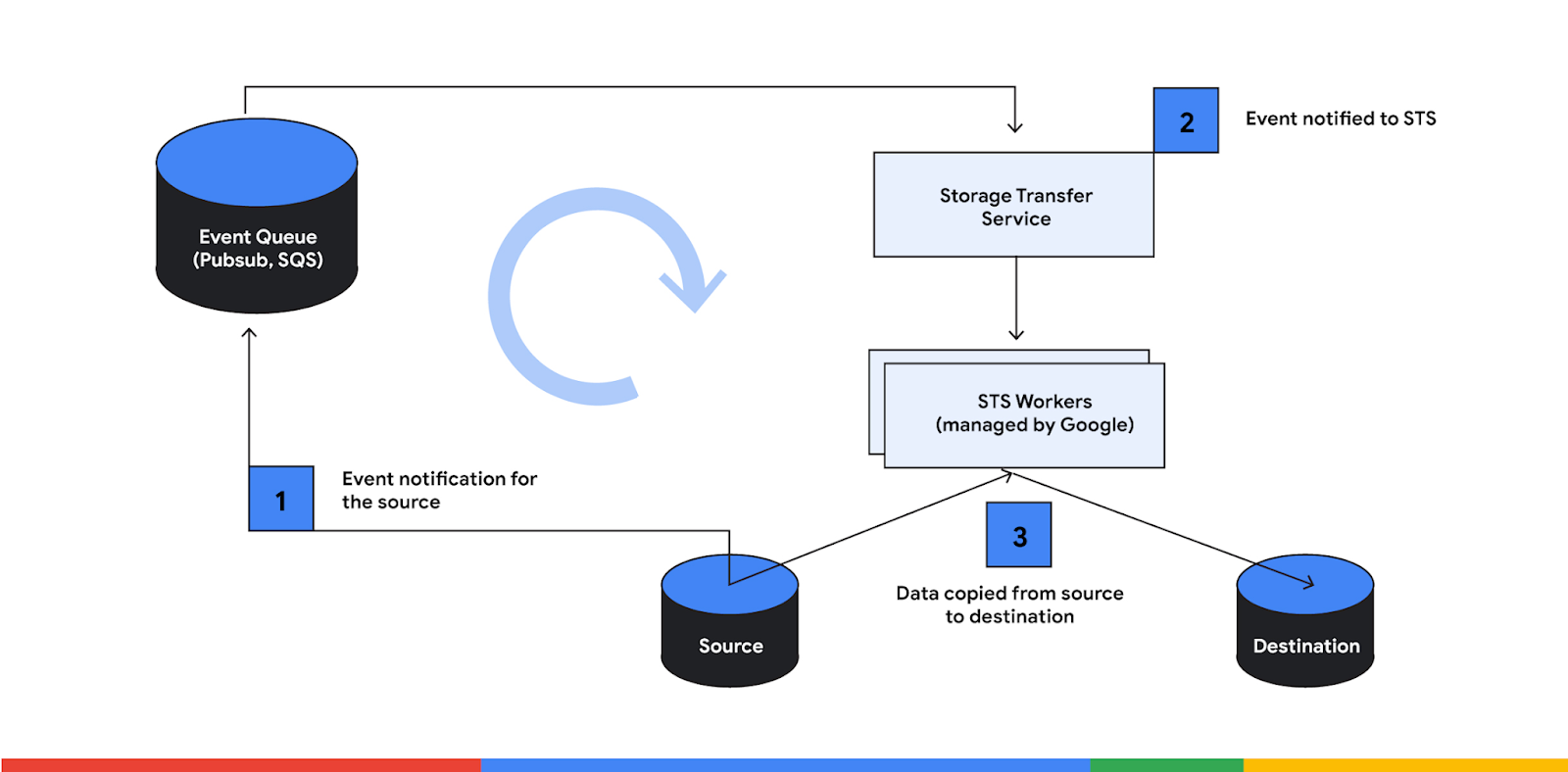
 Last January 7, 2023, Google Cloud announced a new capability for Storage Transfer Service (STS). Now, users can do an event-driven transfer quickly to a Cloud storage whenever there are changes to a source bucket. The event-driven transfer is an execution mode on Storage Transfer Service that allows transfer to a destination using the events from the source as triggers. Google Cloud claims that the transfer rate is near-real-time between the source and its destination.

Here are some of the use cases of event-driven transfer:

  • Event-driven Analytics

  • Cloud Storage Replication/Data Aggregation

  • Disaster Recovery/High Availability

  • Cross-cloud Backup (AWS S3 backup to Cloud Storage)

  • Cross-region or Cross-project backup


  • Live migration


Not only can you use this for Cloud Storage buckets, but STS can also transfer objects from AWS S3 to Cloud Storage. When using the AWS S3 bucket as a source, you need to create an SQS queue, enable event notifications on the S3 bucket and set up the required permission. Check the detailed steps here.

Permission Required

When using setting up even-driven transfer within Google Cloud, ensure that the following permissions are correctly configured.

Description

Roles

Permission

Permission to read the source Cloud Storage bucket

roles/storage.legacyBucketReade

roles/storage.objectViewer

storage.buckets.get and storage.objects.get

Permission to write on the destination Cloud Storage bucket

roles/storage.legacyBucketWriter

storage.objects.create

Permission to subscribe to the Pub/Sub subscription

roles/pubsub.subscriber

pubsub.subscriptions.consume

How to set up an event-driven transfer using STS?
Event-driven transfer on Storage Transfer Service for Google Cloud Storage

An event should trigger an STS transfer job. Thus, a Pub/Sub subscription should be configured first. This Pub/Sub subscription will listen and get notifications whenever there are events from the Cloud Storage Bucket.

Create Pub/Sub notification for the Cloud Storage you wish to monitor

Event-driven transfer on Storage Transfer Service for Google Cloud Storage

Create a pull subscription

Event-driven transfer on Storage Transfer Service for Google Cloud Storage

 
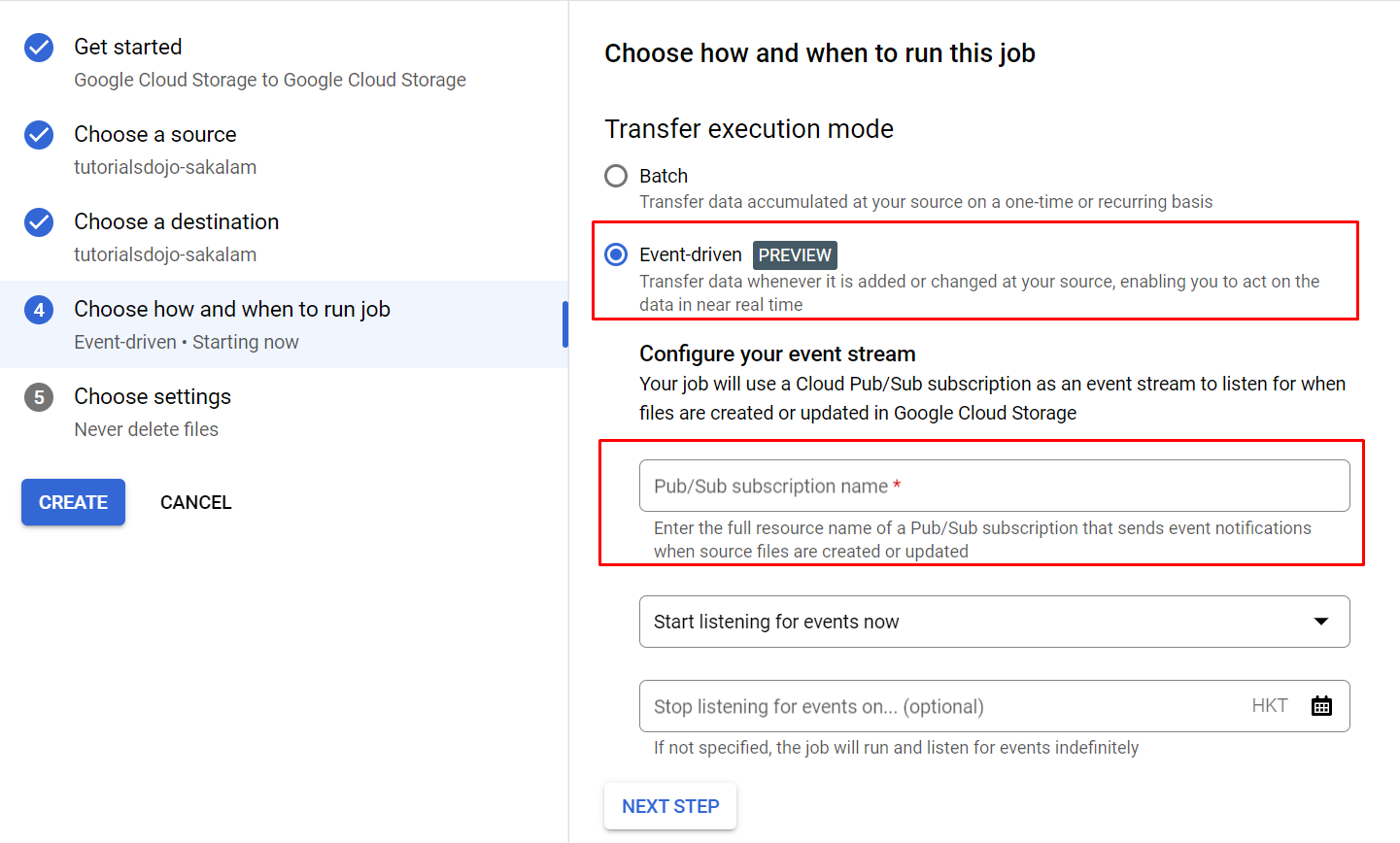
After the Pub/Sub subscription is created, you can now create the Transfer Job from the STS. Select event-driven as the transfer execution mode and enter the Pub/Sub subscription name you have made.

Event-driven transfer on Storage Transfer Service for Google Cloud Storage

Once all of these are configured, you will just wait for Pub/Sub subscription to get an event from the source bucket. After this, the transfer job will be triggered, and the replication will start between the source and the destination. The transfer details are available from the job details page on STS.


Reference: 

Comments

Popular posts from this blog

Google Cloud Pub/Sub

  Cloud Pub/Sub is a fully-managed real-time messaging service for event driven systems that allows you to send and receive messages between independent applications. Features Capable of global message routing to simplify multi-region systems. Synchronous, cross-zone message replication and per-message receipt tracking ensure at-least-once delivery at any scale. Pub/Sub delivers each message at least once, so the Pub/Sub service might redeliver messages. You can declare independent quota and billing for publishers and subscribers. Cloud Pub/Sub doesn’t have shards or partitions. You just need to set your quota, publish, and consume. Key Concepts Topic It is a named resource to which publishers send messages. Subscription Is a named resource representing the stream of messages from a specific topic, to be sent to the subscribing application. Message The combination of data and attributes that a publisher sends to a topic and is eventually sent to subscribers. Message attribute A key...

Google Cloud Dataprep

  Cloud Dataprep by Trifacta is an intelligent data service for visually exploring, cleaning, and preparing structured and unstructured data for analysis, reporting, and machine learning. Features You can transform structured or unstructured datasets of any size — megabytes to petabytes — with equal ease and simplicity. Cloud Dataproc can transform datasets stored in CSV, JSON, or relational table formats. You can process data stored in Cloud Storage, BigQuery, or from your desktop, then export the refined data to BigQuery or Cloud Storage for storage, analysis, visualization, or machine learning. Uses a proprietary algorithm that interprets the data transformation intent of a user’s data selection. You can leverage hundreds of transformation functions readily available to turn your data into the asset you want. Cloud Dataprep enables users to collaborate on similar flow objects in real-time or to create copies for other team members to use for independent tasks. Explore your data ...

Google Cloud Identity and Access Management

  Create and manage permissions for your Google Cloud resources with Identity Access Management (IAM). Provides a unified view into your organization’s security policy with built-in auditing to ease compliance purposes. Features Lets you authorize who can take specific actions on resources to give you full control and visibility on your Google Cloud services centrally. Permissions are represented in the form of  service.resource.verb Can map job functions into groups and roles. With IAM, users only get access to what they need to get the job done. Cloud IAM enables you to grant access to cloud resources at fine-grained levels, well beyond project-level access. You can leverage Cloud Identity to easily create or sync user accounts across applications and projects. IAM lets you set policies at the following levels of the resource hierarchy: Organization level The organization resource represents your company. IAM roles granted at this level are inherited by all resources under t...